Features

Everything it does, from the first click to the sold job.

The builder your customers use on your website, the leads it sends, and the dashboard your team works from. All of it, down to the small stuff.

1

What your customers get on your website

A builder homeowners actually enjoy, so they stay on your site and send you a lead instead of calling three companies for a ballpark.
Design the door

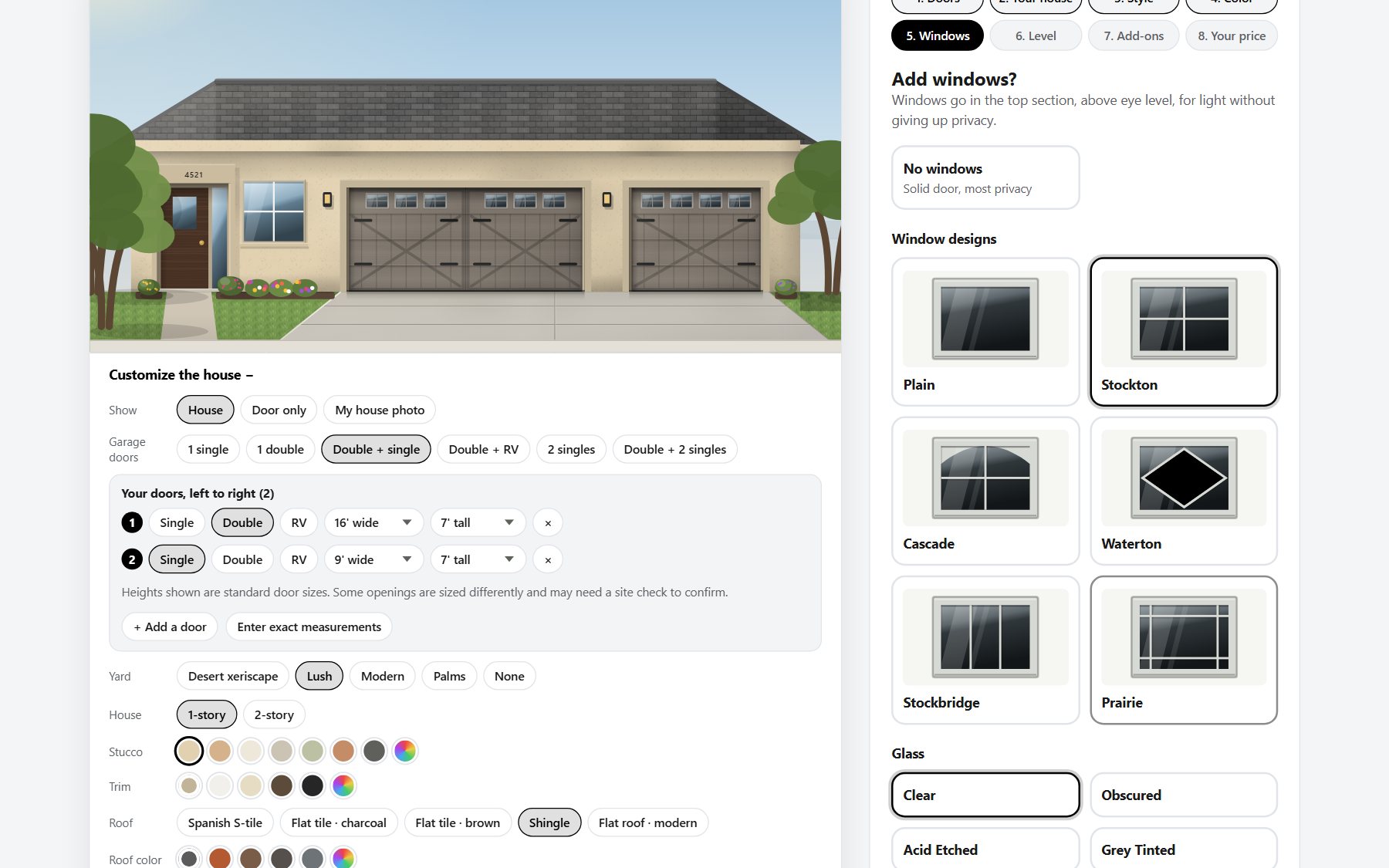
  • Real manufacturer doors. Models, sizes, colors, window designs and glass from the manufacturer's own catalog and sell sheets.
  • Drawn to real size. Panels, windows and sections are drawn from real measurements, so a single and a double next to each other look right.
  • Styles, colors, windows, glass and levels. Step by step, with the manufacturer's own warranty facts shown where they publish them.
  • Up to 10 doors on one quote: singles, doubles and RV doors, each with its own size.
  • Section layouts for taller doors, shown as thumbnails so customers can see the difference.
  • Exact measurements in feet and inches, with odd sizes flagged for a site check instead of guessed.
  • Custom paint preview if you offer painting: the door in the color they pick, labeled as a preview.
  • Trim and add-ons like openers and keypads, with pictures and quantities.
The builder showing a house with a double and a single door and the window choices

On a house, or their own house

A drawn house in 1 or 2 stories they can make look like theirs: stucco, trim, roof, stone, siding, front door, landscaping, driveway and house number. Or upload a photo of their own home and place the doors on it.

Compare up to 4 options

Copy a design to change one detail, or start fresh, then see every option side by side with its price. Customers can name each option.

A price right away

Your price shows as they design: exact, a range, or hidden if you'd rather quote. A full breakdown, sales tax, your terms and how long the quote is good for.

A quote PDF

One tap downloads a PDF with your logo, the house picture, every door and every price line. The same PDF comes to you with the lead.

Save it or share it

Customers can email themselves a link to their design, or copy a link to send their spouse. The link reopens every option on your website.

Repair requests

A "Need a repair instead?" path: what's wrong (broken spring, off track, noisy and more), notes, and a short video of the problem.

Phone first

Designed for phones, then tablets and computers. Big tap targets, no sideways scrolling, and it works turned sideways too.

Accessible

Built and tested against the WCAG 2.2 AA accessibility standard: keyboard friendly, screen reader labels, and clear focus outlines.

Fast

The builder opens in well under 2 seconds on a typical phone, and every choice updates the drawing right away.

2

What lands in your inbox

A lead you can quote from, not a name and a phone number.
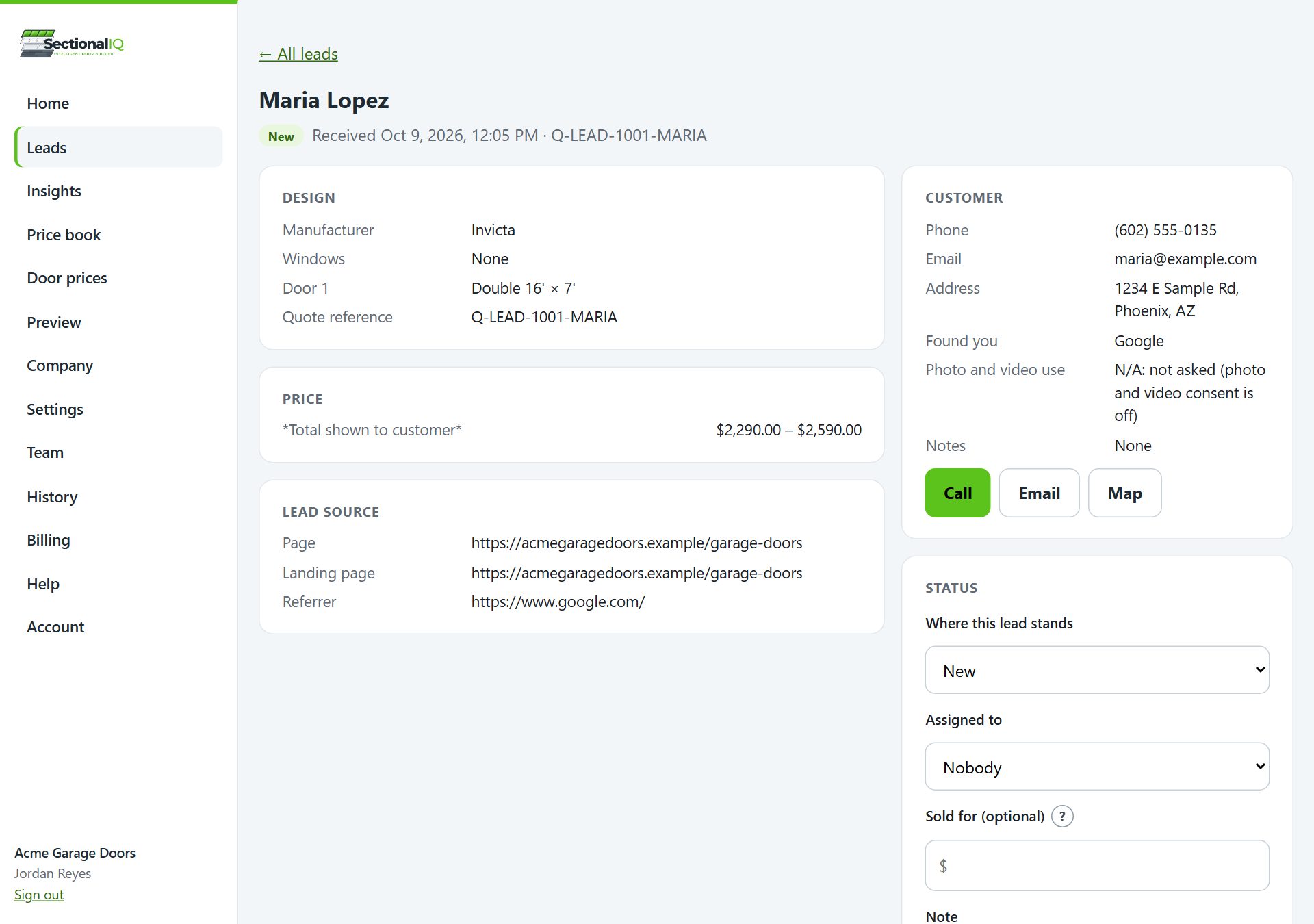
  • The whole design. Brand, style, color, windows, glass and level, every door and size, trim and add-ons.
  • Every price line with its math, the total the customer saw, and the quote reference.
  • A picture of the doors and the customer's house photo, right in the email.
  • The quote PDF attached.
  • Their photos and videos with Watch and Download buttons.
  • "Flagged for site check" at the top when a size isn't standard.
  • Where they came from: Google Ads, Facebook, a search, your QR code, and the page they were on.
  • Photo and video consent: whether the customer said you may use their media in your marketing.
  • Call and Email buttons, and replies go straight to the customer.
  • To everyone who needs it: up to 10 email addresses, plus a phone alert.
A lead in the SectionalIQ dashboard with the design, price and customer details
3

See the job before you roll a truck

Customers can add photos and short videos when they send a design or a repair request: the door opening and closing, the opener, the springs, the outside of the house.

An example of the 15-second video a homeowner can send with their request.
  • Videos up to 60 seconds, checked on the customer's phone before they upload, plus photos.
  • Inside and outside slots on quotes; a big "Show us the problem" area on repairs.
  • Stored for you and playable from the email and the dashboard on any phone.
  • Download them for your records, your website or your Google Business Profile.
  • Ask permission with one switch: customers answer whether you may use their photos and videos on your website, social media and for training your team.

Fewer wasted trips, the right parts on the truck, and real job photos for your marketing when the customer says yes.

4

Running your leads as a team

One inbox for the whole company, on a computer or a phone. It manages the leads the builder brings in; it isn't trying to replace your CRM.
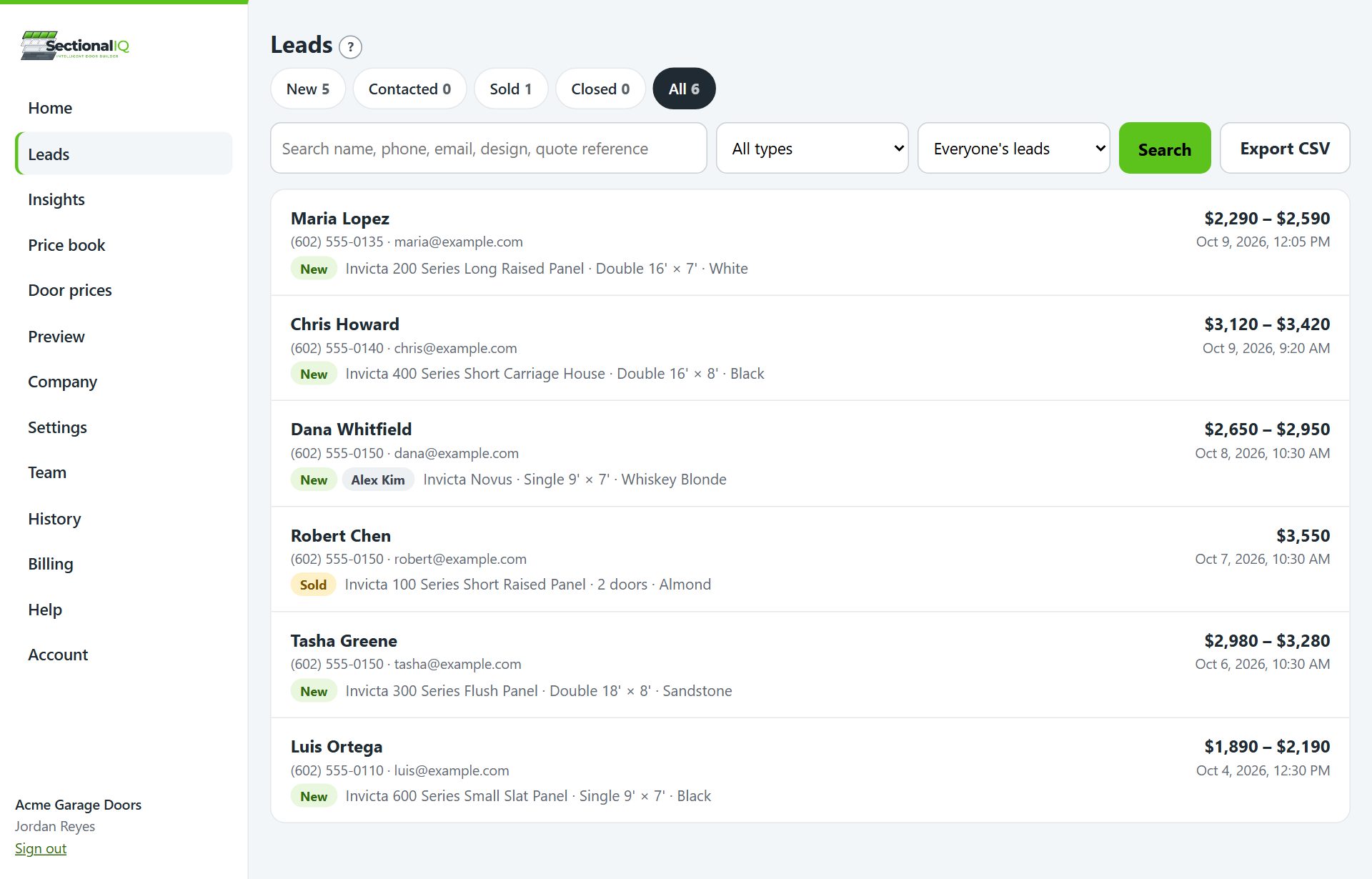
  • Lead inbox with New, Contacted, Sold and Closed, search and filters, and repair requests marked.
  • Record what it sold for when you mark a lead Sold.
  • Assign leads to a person, who gets an email and a phone alert.
  • Team notes on every lead.
  • Roles: admins see everything, managers run leads, reps see only the leads assigned to them.
  • Phone alerts the moment a lead comes in, on iPhone and Android.
  • A phone app: add the dashboard to your home screen and it opens like an app.
  • Weekly summary email every Monday: requests, sales, visits and what customers picked.
  • History: who changed which price or setting, and when.
  • Export to a spreadsheet any time (CSV, opens in Excel).
  • Send leads to your CRM through Zapier: Housecall Pro, Jobber and others.
The SectionalIQ lead inbox with statuses, assigned people and filters
5

Your prices, your way

You set every price. We never supply prices, and your costs never reach your website.
Door prices

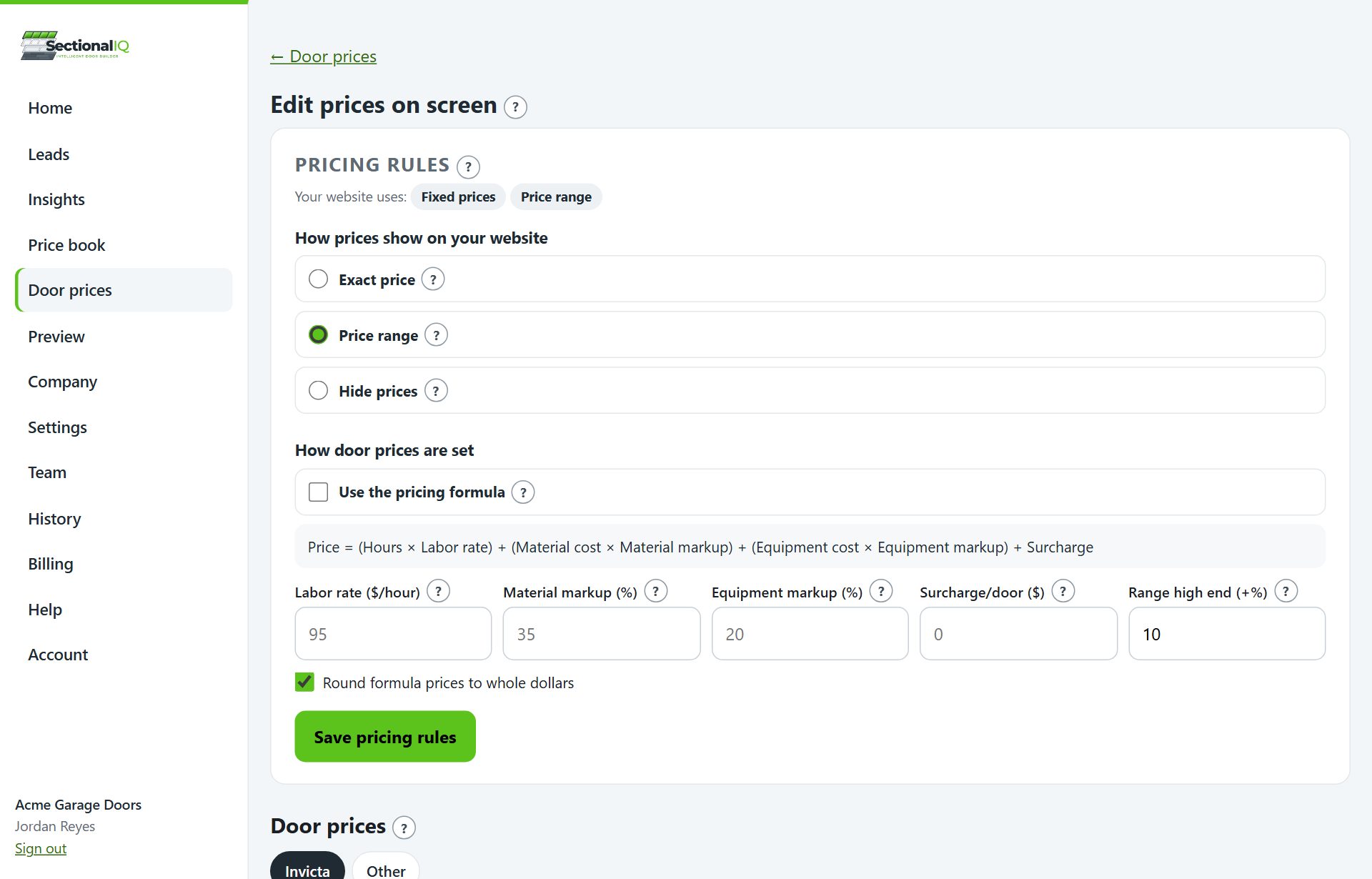
  • Three ways to price: fill in a spreadsheet template, type prices on screen, or use the pricing formula.
  • The pricing formula: labor hours times your rate, plus material and equipment with your markups, plus a surcharge. It works out every retail price for you.
  • Change many prices at once by a percent or a dollar amount, with a preview before anything saves.
  • Colors, windows and glass per door, per square foot, per window or per section.
  • Trim by the foot or by the stick, premium colors, and trim painting.
  • Custom paint by the square foot, a flat price, or your own rules.
  • Show it how you like: an exact price, a range, or hidden ("Request your quote").
  • Sales tax on everything or on materials only, your terms, and how many days a quote is good for.
  • Offers with a last day, shown with the price and hidden automatically when they end.
  • Only what you stock: turn off door brands, styles, colors and window designs you don't sell.
Door prices in the SectionalIQ dashboard: pricing rules and prices by model and size

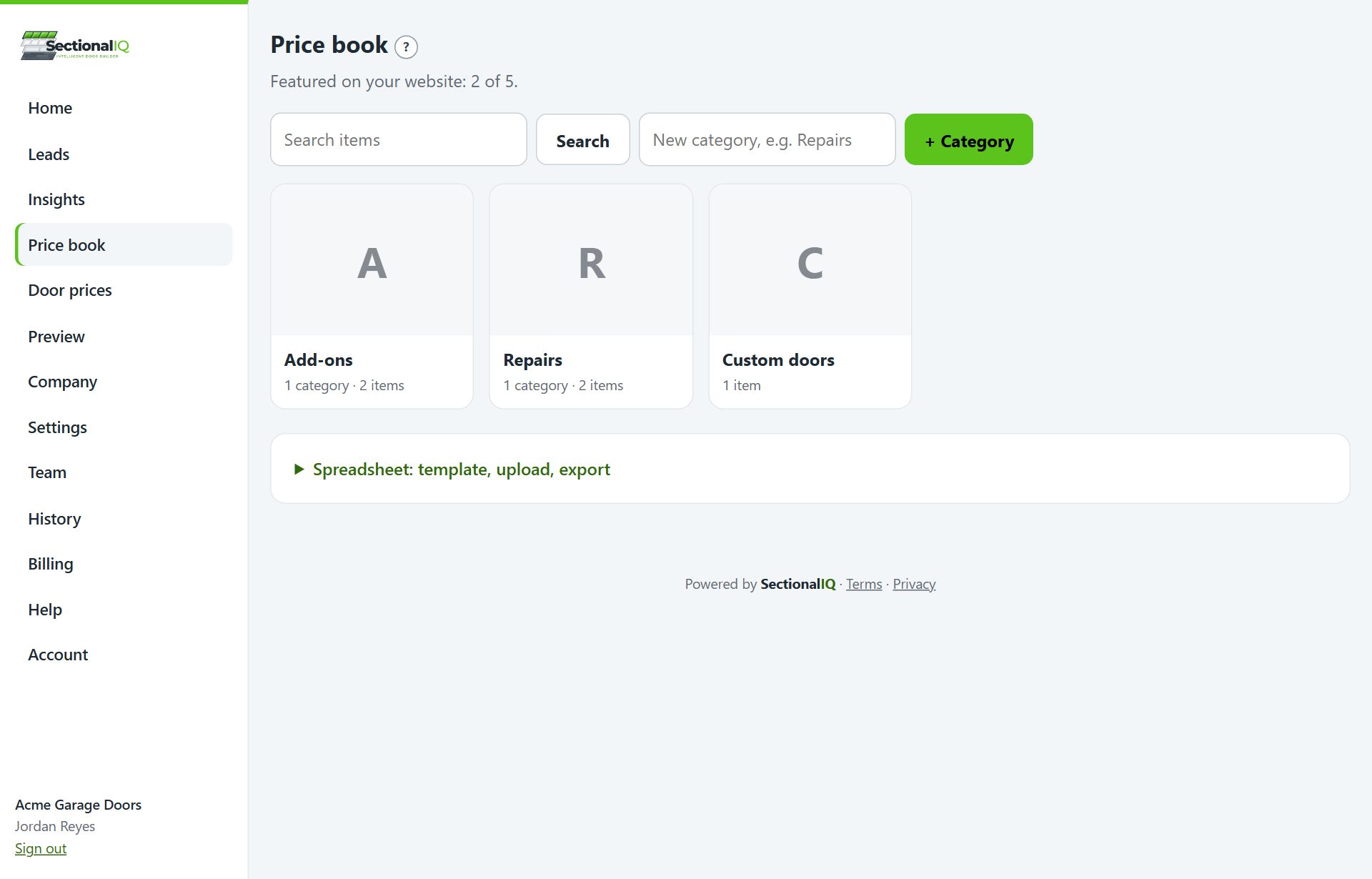
Price book

  • All your other prices in one place: repairs, parts, openers, service calls.
  • Categories you click into, like Repairs, then Springs, with pictures.
  • Search it from a phone so techs can look up a price in the driveway.
  • Feature up to 5 add-ons in the builder with a picture and price.
  • Spreadsheet in and out: upload your list, export it any time.
The SectionalIQ price book with categories and items
6

Know what's working

The numbers behind your website, without setting up anything.
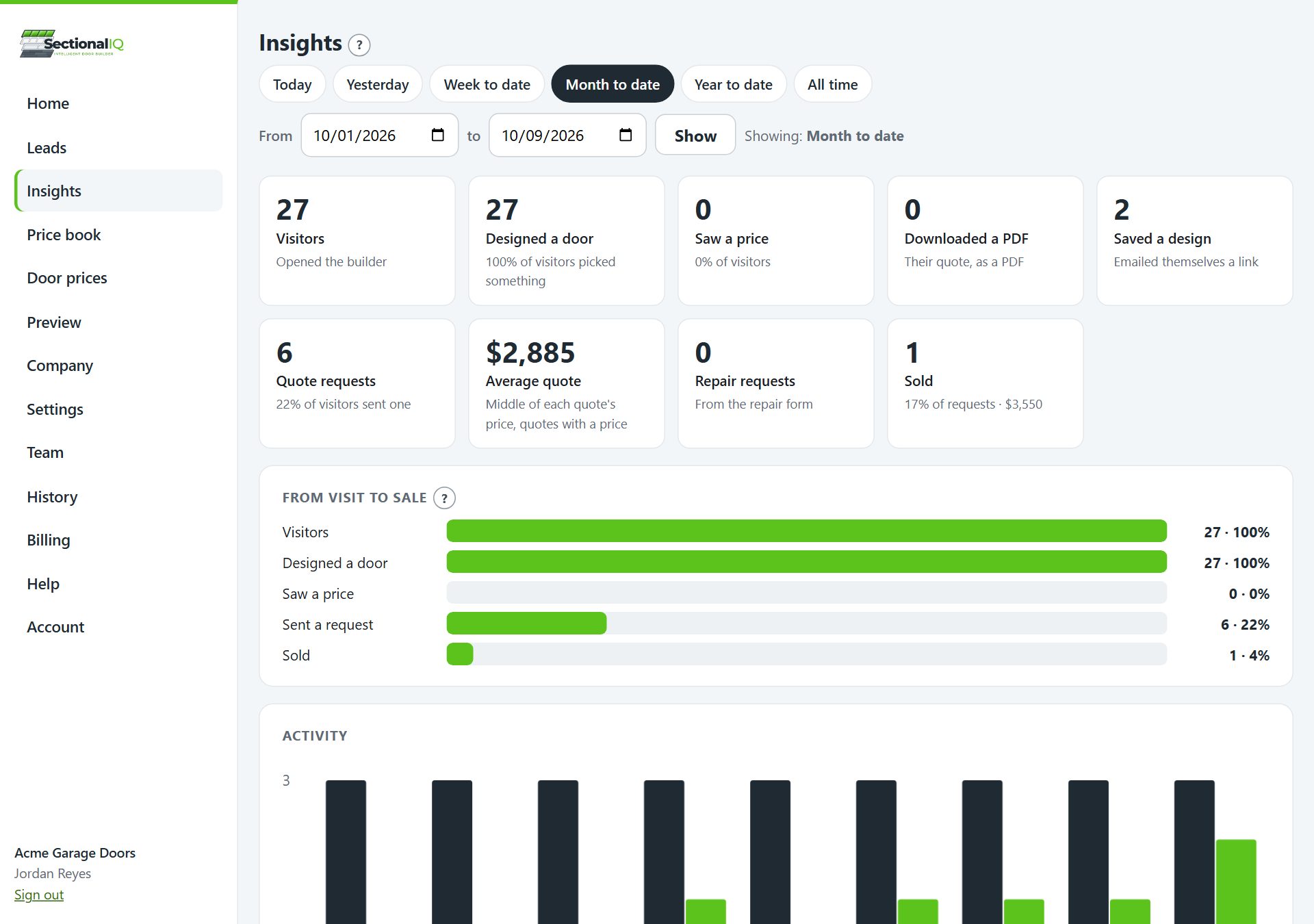
  • Visit to sale, step by step: how many opened your builder, designed a door, saw a price, asked for a quote and bought.
  • What customers pick: the brands, styles, colors, windows and levels they tap most.
  • Where requests come from: Google Ads, Facebook and Instagram ads, Google search, Yelp, Nextdoor and more.
  • Average quote and how many leads you sold.
  • Which pages of your website bring in the most leads.
  • Ad conversion tracking: every lead counts as a conversion in Google Ads, Google Analytics and Facebook, with its value.
  • A short link and QR code for trucks, stickers, door hangers, yard signs, etc., tracked separately so you know what print brings in.
  • Anonymous by design: builder visits are counted without names or contact details.
Insights in the SectionalIQ dashboard: visitors, designs, quote requests and sales
7

Your brand everywhere

Customers deal with your company the whole way through.

Your logo and colors

On the builder, the quote PDF and the dashboard.

Your company details

Address, up to 5 labeled phone numbers, license numbers, email and website, printed on every quote.

Your words

Your terms on every quote, your offers, and your privacy policy linked under the Send button.

8

Setup and help

Up and running in an afternoon, with help whenever you need it.

One snippet

Paste it once. We host the builder and keep it updated, so there's nothing to install or maintain.

Preview first

See your builder with your prices before it goes live, and send yourself a test lead.

A setup checklist

Your dashboard home walks you through each step until you're live.

Help with videos

Step-by-step help articles, most with a short captioned video and screenshots.

An assistant

Ask a question in plain English on any dashboard page and get the steps.

9

Your data is yours

Your leads, prices and customers belong to your company.

Never sold

We don't sell your data or your customers' information, and we never share it with other dealers.

Never used to train AI

Your leads and prices aren't used to train AI models.

Costs stay private

Your costs, markups and labor rates stay in your dashboard. Only your retail prices reach your website.

Secure sign-in

Emailed sign-in codes or a password, and you can sign out every device at once.

Only your websites

Leads and uploads are accepted only from the websites you list.

Take it with you

Export your leads and price book whenever you like.

Want to see it with your door brands?

Book a short demo and start your 30-day free trial.

Book a demo